What Is a CNC Router? A Beginner’s Guide to CNC Routing

In this guide, we’ll explain what a CNC router is, how CNC routing works, the key parts of a CNC router, and the common materials and applications it’s used for. If you’re evaluating whether CNC routing is right for your workshop, this will give you a clear foundation without the sales fluff.
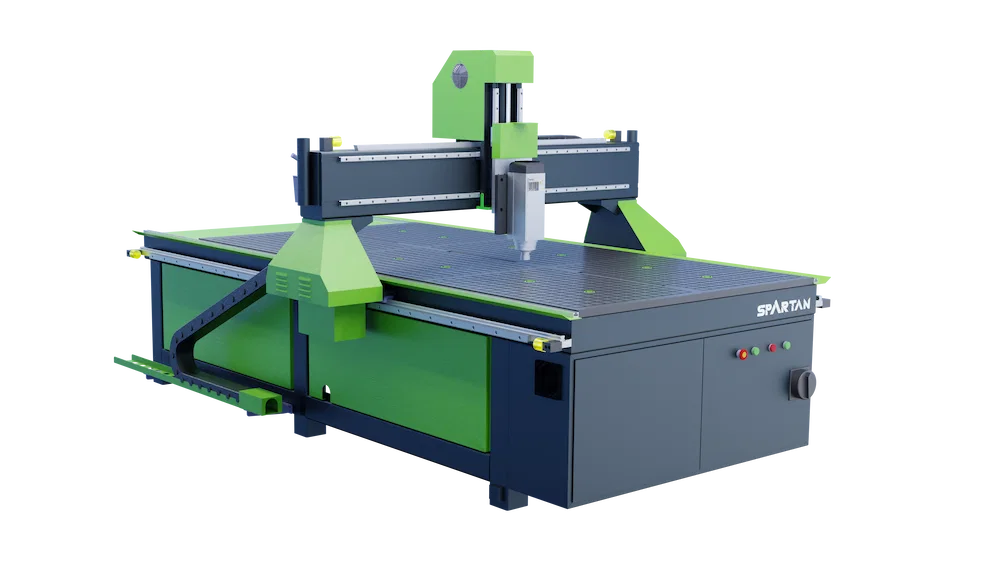
What is a CNC Router?
CNC routers are widely used for woodworking, signage, plastics, composites and many other workshop applications. Depending on the machine and tooling, they can also be used for non-ferrous metals such as aluminium or brass — though cutting performance varies by system and setup.
How CNC Routers Work
A CNC router works by moving a cutting tool along a planned path to remove material and create a finished shape. Most workflows follow the same steps:
- Design the part in CAD software (or import an existing file)
- Generate toolpaths in CAM software (how the tool will move and cut)
- Send the program to the CNC controller
- Set the workpiece and confirm your zero/start point
- Run the job, with the router following the toolpath to cut the part
Because the movement is controlled digitally, you can achieve repeatable results across one-off prototypes or small batch production.
Key Components of a CNC Router
While CNC router designs vary, most machines share the same core components:
- Frame and bed – the structure that supports the machine and keeps cutting stable
- Spindle – the motor that drives the cutting tool
- Motion system – rails and drives that move the gantry and tool accurately
- Controller – the “brain” that reads the program and coordinates movement
- Workholding – how the material is secured, such as clamps or a vacuum bed
- Dust extraction – important for clean cutting and a safer workshop environment
Understanding these basics makes it easier to compare machines later — and to understand why stability, workholding and support matter as much as raw cutting capability.
What Can You Make With a CNC Router?
CNC routing is used for both creative and production work. Common examples include:
- Cabinetry and furniture components
- Signs, lettering and display panels
- Joinery, doors and architectural pieces
- Prototypes and custom product parts
- Plastics and composite components
- Packaging, foam inserts and templates
For many workshops, the biggest value is being able to move from idea to finished part quickly — with consistent quality from one job to the next.
What materials can a CNC router cut?
CNC routers are best known for processing sheet materials, but the exact capability depends on the machine’s rigidity, tooling and setup. Common materials include:
- Wood and wood-based boards (MDF, plywood, hardwoods)
- Plastics (acrylic, PVC, HDPE and similar materials)
- Composites (such as carbon fibre sheets, depending on dust control and tooling)
- Foam and insulation boards for patterns, packaging and moulds
Some CNC routers can also work with non-ferrous metals like aluminium or brass, but this depends heavily on the machine design, spindle, tooling and feeds/speeds. If metal cutting is a key requirement, it’s best treated as an application to confirm rather than an assumption.
Is a CNC router right for your workshop?
If you’re considering CNC routing, a few practical questions usually matter more than the technical details at the start:
- Do you want to bring cutting and production in-house instead of outsourcing?
- Do you have repeat jobs, prototypes, or small-batch work that would benefit from consistency?
- Is workshop space, extraction and power already in place (or easy to add)?
- Do you have access to training and support to get productive quickly?
For most beginners, the learning curve is manageable when the software is straightforward, training is included, and support is available when you need it.
Want to Learn More About Our Range?