V-CAM & V-CUT Control Software – European-Developed CNC System for Fibre Laser Cutting
What is V-CUT?
What is V-CAM?
Key Benefits of the Combined System
Future-Proof Technology
Unified Workflow
Fast Job Preparation
Accurate, Smooth Cutting
Lower Training Time
Core V-CAM Features
DXF & DWG Import for Laser Cutting
Automatic & Manual Nesting
Geometry Cleanup & Repair
Lead-In / Lead-Out Control
Kerf Compensation & Micro-Joints
Batch Processing & Production Jobs
NC Code Generation for V-CUT
V-CAM User Interface
Comparison Table - Starter versus Expert
How V-CUT and V-CAM Work Together
1. Design / Import
2. Nest & Optimise
3. Generate NC Code
4. Send to V-CUT
5. Cut with Precision
A Professional Laser CAM Solution for Production Environments
Core V-CUT Features
Advanced Motion Control
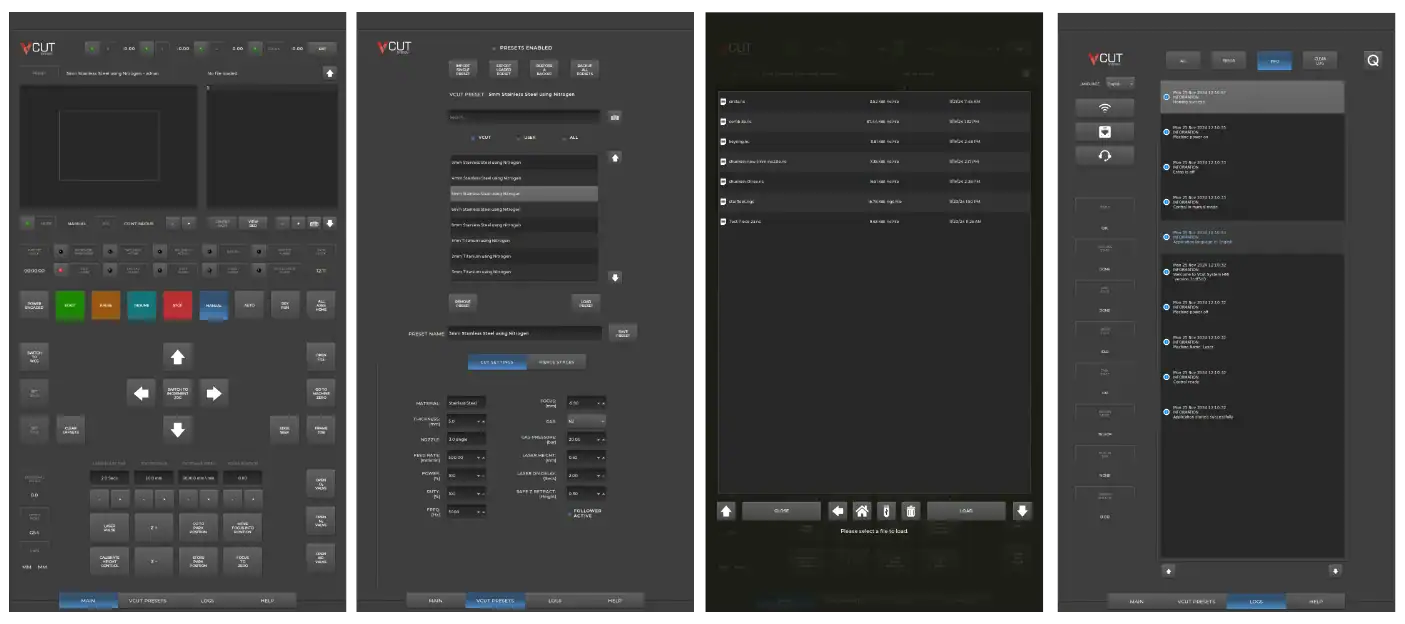
Touchscreen Custom Interface
Real Time Motion Control
Remote Support
Auto Height Control
CE and UKCA Safety Performance Standards
Safety & Diagnostics
V-CUT User Interface
FAQ's
A modern, UK-developed touchscreen CNC control system used to operate Vector fibre lasers.
Diagnostics & remote support
Material/technology databases
V-CUT is the operational “brain” of your fibre laser machine, controlling your machine operation and settings.
V-CAM (European Developed) is used after a part has been designed and focuses on preparing that design for laser cutting.
Typical tasks include:
Importing DXF, DWG and other 2D CAD files
Cleaning and repairing geometry for reliable toolpath creation
Automatically or manually nesting parts on sheet material
Applying lead-ins, lead-outs and kerf compensation
Creating micro-joints / tabs where required
Generating optimised NC code for fibre laser cutting
Saving cutting programs ready for the V-CUT control system
This makes V-CAM ideal for fabrication shops, manufacturers and production environments working from customer-supplied drawings.
V-CUT receives continuous updates and remote support; V-CAM leverages a globally recognised CAM engine.
From drawing import and nesting through to final cutting, V-CAM and V-CUT work together to deliver a smooth, production-ready workflow.
V-CAM provides powerful nesting and automatic NC creation, reducing prep time.
V-CUT’s motion control engine ensures clean, consistent cutting performance.
Operators only need to learn one integrated environment, reducing onboarding.
V-CAM Starter or Expert (Starter is the best option for new users of fibre lasers, whereas Expert is for users who have more experience) Powered by Libellula - Professional CAM for Laser Cutting
Easily import industry-standard 2D CAD files and prepare them for cutting with the V-CUT fibre laser control.
Optimise sheet usage with intelligent nesting algorithms that reduce waste and improve material efficiency.
Automatically detect and correct common drawing issues such as gaps, overlaps and duplicate lines to ensure clean toolpaths.
Fine-tune cut entry and exit points to improve edge quality, particularly important for stainless steel and aluminium.
Accurately compensate for laser kerf width and add micro-joints to prevent part movement during cutting
Prepare multiple parts and sheets efficiently for production runs or mixed-part nesting.
Generate optimised cutting programs ready to load directly into the V-CUT laser control system.
V-CAM Powered by Libellula - Professional CAM for Laser Cutting. This separation of CAM preparation and machine control ensures both systems remain powerful, stable and easy to use.
User imports drawing into V-CAM.
Files are imported, cleaned, nested and optimised for laser cutting.
V-CAM creates efficient cutting programs with correct parameters.
The NC file is loaded into V-CUT, where the machine executes the cut using advanced motion control and optimisation.
V-CUT handles real-time motion, pierce timing and cut quality.
As a dedicated laser CAM software, V-CAM provides all the tools required to take CAD drawings and turn them into efficient fibre laser cutting programs. Combined with the V-CUT control system, it delivers a complete, reliable and industrial-grade workflow - from file import to finished cut.
UK Developed and Manufactured Machine Controller
Smooth acceleration, corner accuracy, high-speed stability.
Developed in-house by our UK R&D – Simple, modern and intuitive for all operators.
Highly customisable for laser cutting applications, providing industrial-grade reliability
Our engineers can connect securely to your system for troubleshooting and performance checks.
Automatically senses and adjusts for surface variations, protecting the cutting head and ensuring consistent quality.
created to meet or exceed current CE and UKCA safety and performance standards.
Integrated alarms, remote support and system logs.
V-CUT is a UK-designed touchscreen CNC laser control system used to operate Vector fibre laser cutting machines. It manages machine motion, cutting parameters, real-time monitoring and diagnostics during the cutting process.
V-CAM is the CAM (Computer-Aided Manufacturing) component of the V-CUT software package. Based on Libellula, well known European software developer, it prepares existing CAD drawings for fibre laser cutting through nesting, geometry optimisation and NC code generation.
No. V-CAM is not a full CAD design package. It does not replace CAD software such as AutoCAD, SolidWorks or Fusion. Instead, it is designed to import existing DXF or DWG files and prepare them for efficient laser cutting.
V-CAM supports all common 2D CAD formats used in laser cutting, including DXF, DWG, AI, SVG and more.
Yes. V-CAM includes geometry analysis and repair tools that can automatically detect and correct common issues such as gaps, overlaps and duplicate entities to ensure clean toolpath generation.
Yes. V-CAM provides automatic and manual nesting tools to optimise sheet usage, reduce material waste and improve production efficiency.
V-CAM is used to prepare and optimise jobs, while V-CUT runs the machine. Once NC code is generated in V-CAM, it is loaded directly into V-CUT, where cutting parameters, motion control and execution are handled.
Yes. V-CUT uses advanced motion control algorithms, intelligent pierce control and smooth cut-path handling to improve edge quality, consistency and repeatability across a wide range of metals.
Yes. While powerful enough for production environments, both V-CUT and V-CAM are designed to be intuitive and easy to learn, significantly reducing operator training time.
Yes. Operator training is included as part of the system, covering job preparation, safe operation and best-practice cutting workflows.
Yes. V-CUT is developed in the UK specifically for industrial fibre laser cutting for Western markets, with ongoing updates and support provided by the engineering team.
Yes. V-CUT includes remote support capabilities, allowing diagnostics, troubleshooting and software updates without the need for on-site visits.
V-CUT and V-CAM are standard across the Vector fibre laser range from FL60 to FL130 with our larger machines in development.